
Compliance checks
Does this transaction pass our policy? Checked on every one.
Compliance checks automation turns your written policies into checks your systems run on every order, payment or new account. Each result is recorded with the rule that applied, ready when audit asks.
Incoming request
evaluatingCan we ship order SO-5521 to this address?
- If the delivery country is on the Restricted countries list, block the order
- If any product on the order is in the Controlled items list, send it to compliance review
- If the order is over £20,000 and the customer is new, send it to compliance review
- Otherwise, release the order
Answer, with the reason
Send to compliance review. The delivery country is not restricted and no controlled items are on the order, but at £22,000 for a new customer it meets the review threshold. The warehouse holds the pick and the trace tells compliance exactly why.
Sound familiar?
Policy on paper, gaps in practice
The policy was signed off. Whether it is followed depends on who is on shift.
"We check the big ones"
Manual checks happen on the orders that look risky. The ones that do not look risky are not checked at all, and those are the ones that cause trouble.
"The restricted list changed last month"
Compliance updated the list and sent an email. Half the team saw it, and the systems carried on using the old version.
"Prove the check was done"
An auditor asks for evidence that a sample of transactions was screened. The team can show the policy, but not that it was applied.
The quiet cost
What patchy compliance costs
- Transactions go through that your own policy says should have been stopped.
- Policy changes take weeks to reach every system that should apply them.
- Audits turn into a hunt for evidence that checks actually happened.
- Compliance staff check routine cases by hand instead of focusing on real risk.
Before and after
From spot checks to every transaction checked
Today
- Checks applied to a sample, or when someone remembers
- Restricted lists copied into each system separately
- Each team interprets the policy in its own way
- No evidence that a check ran on a given transaction
With Condexa
- The same checks run on every transaction, automatically
- One list, maintained by compliance, used by every system
- One published version of the policy, applied the same way
- A recorded trace for each check, showing which rule applied
How you get there
How your policy gets applied every time
- 1
Policy that systems can follow
Compliance writes each check as a step: is the country on the restricted list, is the value over a threshold, does it need review. Lists and thresholds stay under compliance's control.
- 2
Certainty before it goes live
Run past transactions through the checks, including ones that should fail. The trace confirms each rule fires as the policy intends.
- 3
Evidence for every transaction
Your order, payment or onboarding system calls the checks as it works. Every result is stored with its inputs and trace, so proving compliance is a search, not a project.
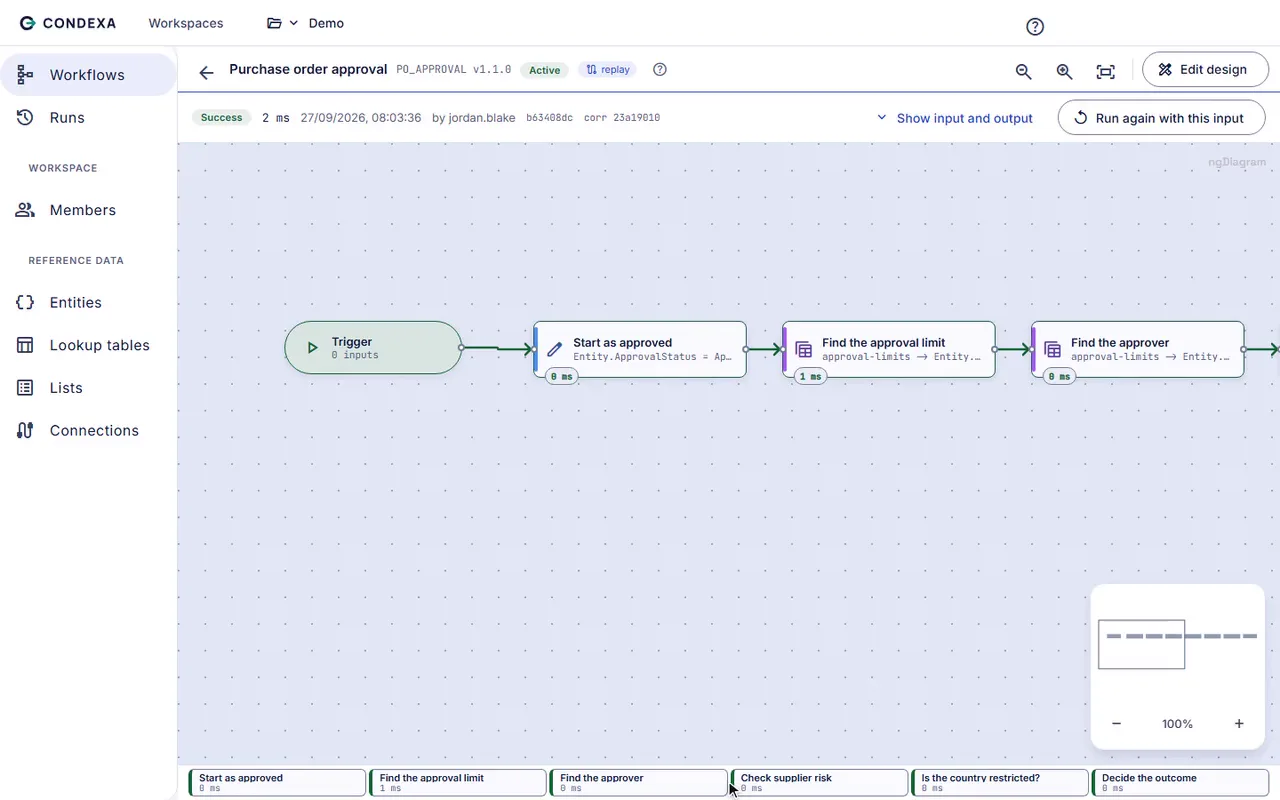
A worked example
Example: screening an export order
Sales order SO-5521 for £22,000 of machine parts is due to ship to a new customer overseas. The warehouse is ready to pick it.
The rules, in plain English
- R1If the delivery country is on the Restricted countries list, block the order
- R2If any product on the order is in the Controlled items list, send it to compliance review
- R3If the order is over £20,000 and the customer is new, send it to compliance review
- R4Otherwise, release the order
Condexa answers
Send to compliance review. The delivery country is not restricted and no controlled items are on the order, but at £22,000 for a new customer it meets the review threshold. The warehouse holds the pick and the trace tells compliance exactly why.
FAQ
Questions people ask
What is compliance checks automation?
It means turning written policies into rules that your systems apply automatically on every relevant transaction. Instead of relying on people to remember a check, the system asks for a decision and acts on it, and the result is recorded.
Which compliance checks can be automated?
Any check that follows a clear rule can be automated, such as restricted country screening, value thresholds, missing document checks and referrals for review. Checks that need human judgement can still be automated up to the point of referral, so a person only sees the cases that need them.
How do we prove to an auditor that a check was applied?
Each Condexa decision is recorded with its inputs, its output and a full trace of the steps it took. You can open the run for any transaction and show which rule applied and which version of the policy was live.
Who keeps the restricted countries list up to date?
Your compliance team does. Lists and lookup tables sit in Condexa where the people who own the policy can update them, and every system that calls the decision uses the new list straight away.
Can different teams have different access to compliance rules?
Yes. Workspaces separate areas of work, and roles such as viewer, author, publisher and owner control who can see, change and publish rules. So compliance can own its checks while other teams can only view them.
Keep exploring
Related decisions and guides
Problems
Unexplained decisions
Can you explain why the system declined that order? Keep a step-by-step record behind every automated answer.
Read moreFeatures
Workspaces
Worried the wrong person could change a live rule? Give each team its own workspace and roles that match their job.
Read moreUse cases
Supplier onboarding
Check every new supplier against the same criteria before the first order, not after something goes wrong.
Read moreIndustries
Financial services
When a customer or auditor asks why they were declined, show the exact rule, the data it used and the version in force.
Read moreTrust
Security
How Condexa protects your data and your decisions.
Read moreTurn one policy into a check that runs on every transaction
Bring a decision your team makes every week. We will build it with you, live, test it against your own examples and show your systems calling it.
No slides. Your decision, built live. No obligation.