
Compare: spreadsheets
Condexa vs spreadsheets
Rules engine vs spreadsheet is not about which is cleverer. It is about which one your ERP can ask, which one you can test before a change goes live, and which one can tell an auditor why.
Incoming request
evaluatingWhich version of the approval matrix is the real one?
- Look up the customer's tier and the product group's maximum standard discount.
- If the requested discount is within the standard maximum, approve it.
- If it is up to 5 points above, the sales manager must approve.
- Anything higher needs the commercial director.
Answer, with the reason
Quote Q-3310, 18% on fasteners for a Tier B customer: sales manager approval needed. The standard maximum for Tier B fasteners is 15%, so 18% is 3 points above. The trace shows the tier, the table row used and the rule that fired.
Sound familiar?
The spreadsheet only Sarah understands
Spreadsheets are where most business rules start, and for good reason. They are flexible, familiar and nobody needs permission to open one. The problems arrive when the spreadsheet stops being a model and starts making decisions.
Formulas break quietly
Someone inserts a row, a range stops one line short, and a lookup starts returning the wrong band. Nothing turns red. The wrong answer just keeps coming out until someone notices.
Which copy is the real one?
Approval Matrix v3 final, v3 final (2), the one attached to last month's email. People decide using whichever copy they have, and they are not always the same.
Systems cannot ask it
Your ERP cannot call a spreadsheet. So someone reads the answer and types it in, or copies the values into a system table that then drifts out of date.
The quiet cost
What spreadsheet decisions quietly cost
- A missed credit hold because a lookup range was one row short.
- Two people applying two versions of the same policy.
- Key person risk: when the owner is on leave, the decisions wait.
- No record of which version of the sheet gave which answer, or why.
Before and after
From a fragile sheet to a decision your systems call
Today
- Limits and bands live in cells anyone can overwrite.
- Changes go live the moment someone saves.
- Systems cannot ask the spreadsheet for an answer.
- Nobody can show which rule produced last quarter's decision.
With Condexa
- Limits and bands live in lookup tables with controlled access.
- Changes are tested as a Draft, then published as a new version.
- Any system calls the decision over a REST API and gets JSON back.
- Every call is recorded with its inputs, outputs and step-by-step trace.
How you get there
How to replace Excel business rules with Condexa
- 1
Bring the tables across
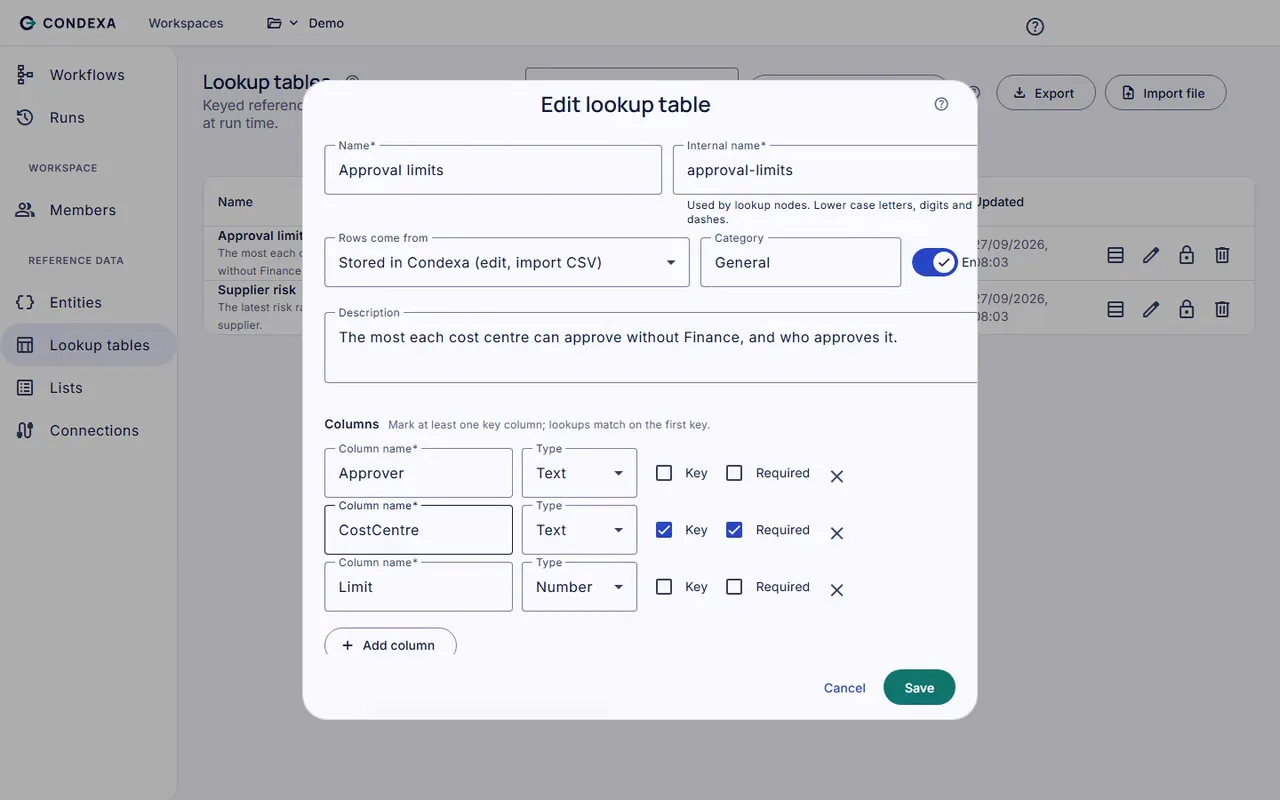
Import your limits, bands and lists as lookup tables. They stay owned by the business and can still be exported as files when someone wants to review them offline.
- 2
Turn the formulas into readable steps
Rebuild the logic on the visual canvas: look up the band, check the list, compare the value, set the answer. Test each case you used to check by hand and read the trace.
- 3
Let systems ask, instead of people copying
Publish the Active version and have your ERP, CRM or Power Apps call it. The answer arrives in milliseconds, and every call is kept in run history.
A worked example
Example: a discount approval sheet
Picture a wholesaler whose sales team checks a spreadsheet before offering discounts. It has tabs for customer tiers, product groups and approver limits.
The rules, in plain English
- R1Look up the customer's tier and the product group's maximum standard discount.
- R2If the requested discount is within the standard maximum, approve it.
- R3If it is up to 5 points above, the sales manager must approve.
- R4Anything higher needs the commercial director.
Condexa answers
Quote Q-3310, 18% on fasteners for a Tier B customer: sales manager approval needed. The standard maximum for Tier B fasteners is 15%, so 18% is 3 points above. The trace shows the tier, the table row used and the rule that fired.
Side by side
Spreadsheets vs Condexa, side by side
| Aspect | Spreadsheet | Condexa |
|---|---|---|
| Getting started | Instant, everyone has Excel | A workflow built on a canvas, or from a pasted JSON sample |
| Flexibility for modelling | Excellent for what-if analysis | Built for repeated decisions, not ad hoc modelling |
| Protection against silent errors | Limited, broken ranges rarely show | Test with example values and read the trace before publishing |
| Knowing which version is live | Depends on file names and discipline | One Active version, with Draft and Inactive versions alongside |
| Callable by other systems | No, people copy answers across | Yes, any system calls it over a REST API |
| Who can change it | Anyone who can open the file | Named members with roles such as author and publisher |
| Record of past decisions | Usually none | Every call recorded with inputs, outputs and trace |
| Reading live data | Manual exports or fragile links | Lookup tables can read SQL Server or Dataverse directly |
| Best suited to | Analysis, forecasting and one-off calculations | Decisions made many times a day that must be consistent |
FAQ
Questions people ask
Can I replace my Excel approval matrix with a rules engine?
Yes. The matrix itself becomes a lookup table and the logic around it becomes a short workflow. You can import the table from a file, test the result against the cases you know, and publish it for your systems to call.
Will my finance team still be able to edit the limits?
Yes. Lookup tables are reference data the business owns. People with the right role can update rows, and the change is tested and published rather than going live the moment someone saves.
Should I stop using spreadsheets altogether?
No. Spreadsheets are excellent for analysis and modelling. The line to draw is when a spreadsheet is making a repeated operational decision that other people and systems rely on. That is the part worth moving.
What is the risk of running decisions from a spreadsheet?
Silent formula errors, several copies in circulation, dependence on one person who understands it, and no record of which answer was given and why. Each one is small until an auditor or a customer asks.
Can Condexa read data we already keep in SQL Server or Dynamics 365?
Yes. A lookup table can hold its own rows, read a SQL Server table or read live from Dataverse, so you do not need to copy data into a sheet first.
Keep exploring
Related decisions and guides
Problems
Spreadsheet decision logic
Your approval matrix lives in Excel, one file has three versions, and no system can ask it anything.
Read moreProblems
Tribal knowledge
When only one person knows how a decision gets made, every holiday and every resignation is a risk.
Read moreFeatures
Lookup tables
Every limit change is a dev ticket? Put thresholds and bands in tables your business team edits and publishes.
Read moreUse cases
Pricing and discounts
Stop discount requests bouncing round by email. Apply price bands and limits consistently and route only the exceptions.
Read moreGlossary
What is an approval matrix?
An approval matrix is a table that sets out who can approve which kinds of spend, commitment or exception, and up to what limit.
Read moreYour spreadsheet should not be making decisions
Bring a decision your team makes every week. We will build it with you, live, test it against your own examples and show your systems calling it.
No slides. Your decision, built live. No obligation.