
Lookup tables and lists
Decision tables your business team can own
Decision table software for the numbers that change most. Approval limits, price bands and restricted lists sit in tables your team edits, while every decision that uses them stays the same.
Incoming request
evaluatingWhat is the approval limit for cost centre CC-220?
- CC-220, Budget holder: up to 5,000 GBP.
- CC-220, Department head: up to 15,000 GBP.
- CC-220, Finance director: up to 50,000 GBP.
- Return the first role whose limit covers the PO amount.
Answer, with the reason
Department head. 11,500 GBP is over the budget holder's 5,000 GBP limit but within the department head's 15,000 GBP. If finance changes the department head limit next month, they edit that one row and publish; the decision itself does not change.
Sound familiar?
The logic is fine. It is the numbers that keep changing.
Most rule changes are not new logic. They are a new limit, a new band or one more country on the list. Yet each one is treated like a software change.
Thresholds hard-coded in the app
The approval limit is a number in the code. Raising it by 2,500 GBP means a ticket, a build and a release.
Reference data in a spreadsheet nobody trusts
The price bands live in a workbook. Three copies are in circulation, and nobody is certain which one the system uses.
Lists that are always out of date
The restricted countries list was last updated by someone who has since left. Nobody knows who owns it now.
The quiet cost
What unmanaged reference data quietly costs
- A limit change the business agreed weeks ago is still not live.
- Two systems use two different versions of the same price bands.
- An order ships to a country that should have been on the restricted list.
- Developers spend time editing numbers instead of building.
Before and after
From numbers buried in code to tables the business owns
Today
- Limits and bands are hard-coded or held in spreadsheets.
- Changing a number needs a developer.
- Lists are copied into several systems and drift apart.
- Nobody can say which value was used for a past decision.
With Condexa
- Limits and bands sit in lookup tables every decision reads.
- The owner edits the table and publishes the change.
- One list is used by every decision that needs it.
- The trace shows which row was matched for every run.
How you get there
How lookup tables and lists work
- 1
Choose where the data lives
A lookup table can hold its own rows, read a SQL Server table, or read live from Dataverse and Dynamics 365. Lists hold simple sets of values, such as restricted countries.
- 2
Use it in any decision
Add a Lookup step to fetch the matching row, or an Is in step to check a value against a list. Many decisions can share the same table.
- 3
Let the business keep it current
The people who own the policy edit the rows, or import and export them as files. The trace shows exactly which row each decision matched.
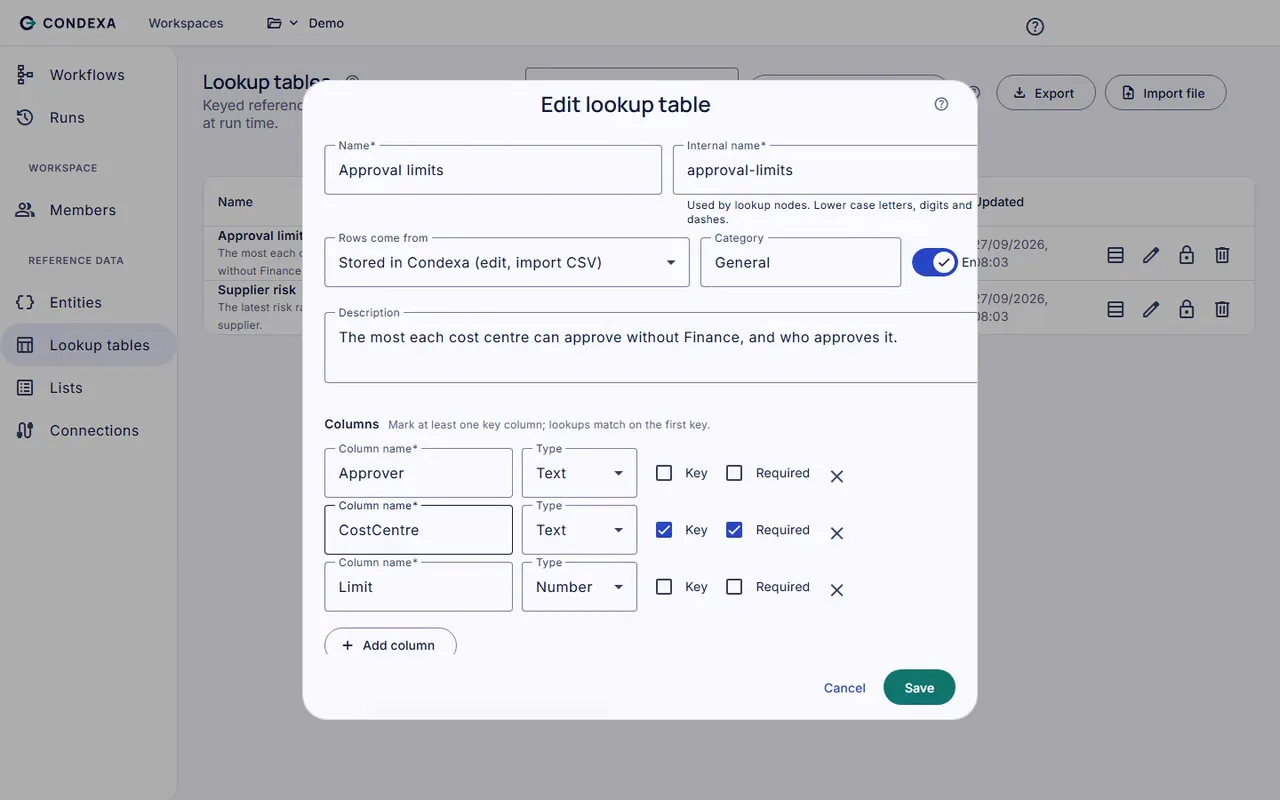
A worked example
Worked example: an approval limits table
A PO for 11,500 GBP is raised against cost centre CC-220. The approval limits table has a row for each cost centre and role.
The rules, in plain English
- R1CC-220, Budget holder: up to 5,000 GBP.
- R2CC-220, Department head: up to 15,000 GBP.
- R3CC-220, Finance director: up to 50,000 GBP.
- R4Return the first role whose limit covers the PO amount.
Condexa answers
Department head. 11,500 GBP is over the budget holder's 5,000 GBP limit but within the department head's 15,000 GBP. If finance changes the department head limit next month, they edit that one row and publish; the decision itself does not change.
FAQ
Questions people ask
What is decision table software?
Decision table software lets you set out conditions and outcomes in rows and columns, such as limits by cost centre and role, and have systems use them to make decisions. Condexa's lookup tables do this job and can be edited by the business without a developer.
What is the difference between a lookup table and a list?
A lookup table has rows and columns, so a decision can find the matching row and read values from it, such as an approval limit. A list is a simple set of values, used to check whether something is in it, such as a restricted country.
Can a lookup table read data from our existing systems?
Yes. A lookup table can read a SQL Server table or read live from Microsoft Dataverse and Dynamics 365 through a connection. It can also hold its own rows if the data does not live anywhere else yet.
Can business users update lookup tables without a developer?
Yes, if they have the right role in the workspace. They edit rows directly or import a file, and the decisions that use the table pick up the change. Workspace roles control who can edit and who can publish.
Can we import our existing spreadsheet?
Yes. Lookup tables can be imported and exported as files, so you can bring an existing approval matrix or price band sheet across and keep a copy outside Condexa too.
Keep exploring
Related decisions and guides
Glossary
What is a decision table?
A decision table is a grid that lists combinations of conditions in rows and the outcome for each combination, so a decision can be read, checked and applied consistently.
Read moreGlossary
What is an approval matrix?
An approval matrix is a table that sets out who can approve which kinds of spend, commitment or exception, and up to what limit.
Read moreProblems
Spreadsheet decision logic
Your approval matrix lives in Excel, one file has three versions, and no system can ask it anything.
Read moreUse cases
Purchase order approval
Stop chasing sign-off by email. Encode your delegation of authority once and let the ERP know who must approve every PO.
Read moreIntegrations
Dynamics 365 and Dataverse
Outgrown Dataverse business rules? Run real decisions on live Dataverse data and call them from any app or flow.
Read moreTake the next limit change off your developers' list
Bring a decision your team makes every week. We will build it with you, live, test it against your own examples and show your systems calling it.
No slides. Your decision, built live. No obligation.