
Unexplained decisions
Can you explain why the system said no?
An audit trail for automated decisions means you can answer "why?" in seconds, not days. Every answer your systems receive comes with a record of the rule, the data and every step in between.
Incoming request
evaluatingWhy was order SO-8812 put on credit hold?
- Look up the customer's credit limit in the Credit limits lookup table
- Add the order value to the customer's current balance
- If the new balance is over the credit limit, place the order on credit hold
- If any invoice is more than 60 days overdue, place the order on credit hold
Answer, with the reason
The run history shows the order was held because the new balance of £31,700 went over the £30,000 credit limit. No invoices were overdue. The account manager can tell the customer exactly what would release it.
Sound familiar?
When someone asks "why?"
The system made the call. Now a customer, a manager or an auditor wants to know how.
"The system just says declined"
A good customer's order is blocked. Sales is on the phone asking why, and all anyone can see is a status with no reason.
"Audit asked why it was approved"
An auditor picks an order from nine months ago. The rule has changed twice since, and nobody can show what it said at the time.
"We'll need IT to dig through the logs"
Answering a simple question means a developer searching log files and reading code. It takes days, and the answer is still a best guess.
The quiet cost
What an unexplained answer costs
- Customers lose trust when nobody can tell them why they were turned down.
- Audits drag on while the team rebuilds what the rules said months ago.
- Wrong answers go unnoticed because no one can see how they were reached.
- Staff override the system because they do not believe it.
Before and after
From a black box to a clear record
Today
- A result with no reason attached
- No way to see which rule was live on the day
- Explaining an answer takes a developer and days of digging
- Mistakes hide inside the logic until a customer complains
With Condexa
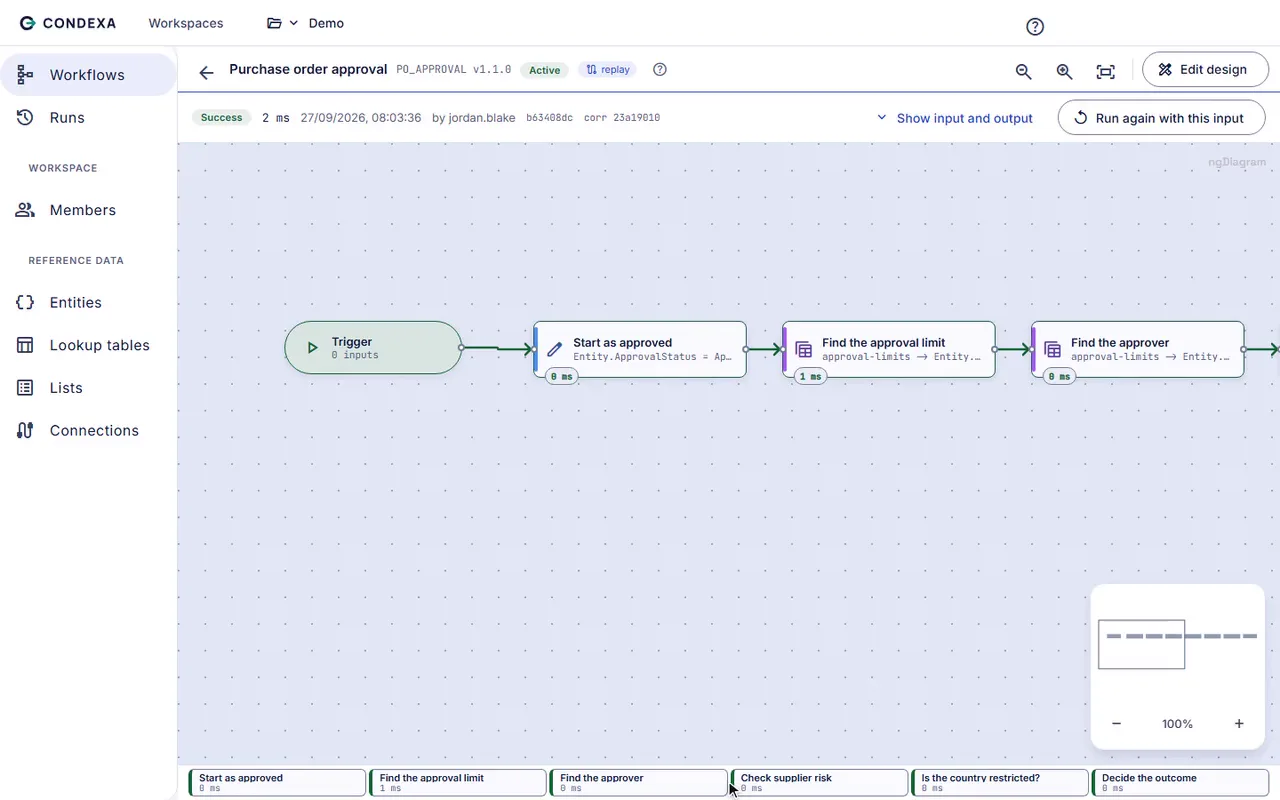
- A step-by-step trace behind every answer
- Each call recorded with the version that produced it
- Anyone with access can open the run and read why
- Every lookup and value visible, so errors are easy to find
How you get there
How you make every answer explainable
- 1
See why before you go live
Run test cases and read the trace: every step, every lookup, every value and how long each took. You know how the decision reasons before anyone relies on it.
- 2
Keep the record of every call
Each time a system asks for an answer, Condexa records the inputs, the outputs and the full trace. Nothing extra to build, nothing to switch on.
- 3
Answer the question months later
When a customer, manager or auditor asks why, open the run in the history and show them. The version, the data and the reasoning are all there.
A worked example
Example: explaining a credit hold
Sales order SO-8812 for £14,200 was put on credit hold. The account manager wants to know why before she calls the customer.
The rules, in plain English
- R1Look up the customer's credit limit in the Credit limits lookup table
- R2Add the order value to the customer's current balance
- R3If the new balance is over the credit limit, place the order on credit hold
- R4If any invoice is more than 60 days overdue, place the order on credit hold
Condexa answers
The run history shows the order was held because the new balance of £31,700 went over the £30,000 credit limit. No invoices were overdue. The account manager can tell the customer exactly what would release it.
FAQ
Questions people ask
What is an audit trail for automated decisions?
It is a record of each decision a system makes: the data it was given, the rules it applied and the answer it returned. A good audit trail lets you replay the reasoning for any single decision, even after the rules have changed.
How do you explain an automated decision?
You need a trace of the steps the decision took, including every lookup and value, and the version of the rule that was live. With that, you can say in plain English which condition led to the result.
How long is the decision history kept in Condexa?
Every call is recorded in the run history with its inputs, outputs and trace. That means you can open a decision made months ago and see why the system answered the way it did.
Does recording every decision slow the system down?
No. Condexa decisions are compiled, and cached decisions answer in milliseconds. The record is kept as part of each run, so the calling system still gets its answer quickly.
Can we see which version of a rule made a past decision?
Yes. Each run is tied to the version that produced it, and earlier versions are kept. So when a rule has changed since, you can still see what it said at the time.
Keep exploring
Related decisions and guides
Features
Decision trace
Someone asks why the system said no. Open the run and show them every step, every value and the rule that decided.
Read moreFeatures
Versioning
Nervous about changing a live rule? Draft it, test it, publish it, and keep every earlier version to fall back on.
Read moreUse cases
Credit decisions
Decide who gets credit, and how much, the same way every time, without waiting for the one person who knows the rules.
Read moreUse cases
Compliance checks
Your policies say what must be checked. Make sure it happens on every transaction, with proof of which rule applied.
Read moreTrust
Security
How Condexa protects your data and your decisions.
Read moreNext time someone asks why, have the answer ready
Bring a decision your team makes every week. We will build it with you, live, test it against your own examples and show your systems calling it.
No slides. Your decision, built live. No obligation.