
Compare: Power Automate
Condexa vs Power Automate: decide, then act
If you are looking for a Power Automate alternative for business rules, you may not need to replace anything. Keep Power Automate for moving the work, and let it ask Condexa for the decision.
Incoming request
evaluatingWhich approver does this flow send PO-24019 to?
- Look up the approval limit for the cost centre and the requester's grade.
- If the amount is within the limit, no approval is needed.
- If the supplier is on the new-supplier list, the procurement lead must also approve.
- Capital purchases over 25,000 need the finance director.
Answer, with the reason
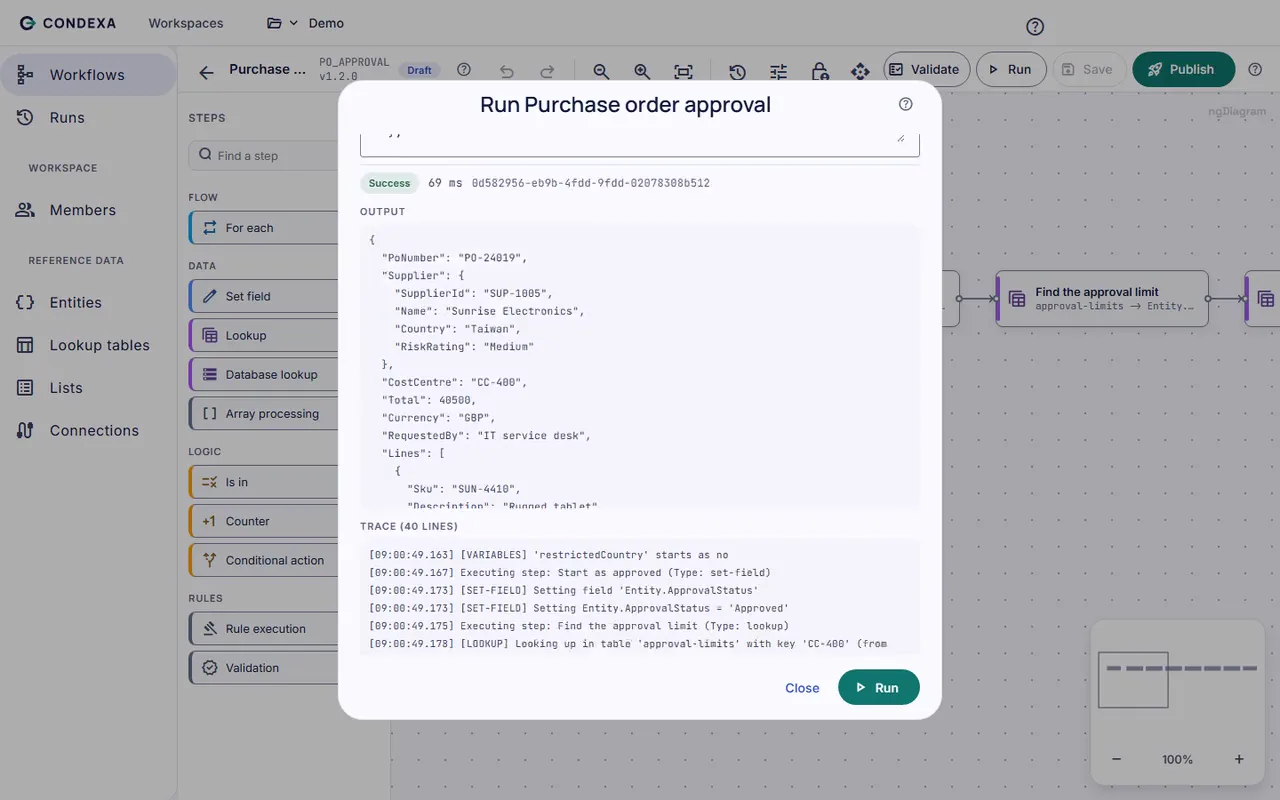
PO-24019, 31,400 for a capital item from a new supplier: finance director and procurement lead. The flow reads that answer from the JSON response and sends both approval requests. The Condexa trace shows the limit row used and each rule that applied.
Sound familiar?
When the flow becomes the policy
Power Automate is very good at what it does: triggering on events, connecting systems, sending approvals and updating records. The strain shows when the business rules themselves end up inside the flow as conditions.
Conditions inside conditions
Amount over 5,000? Then check the cost centre. Capex? Then check the category. Within a few months the flow is a wall of nested branches that only its author can safely edit.
Changing a limit means editing the flow
The finance director moves an approval limit. Someone who knows the flow has to open it, find every branch that uses the old number, change it and hope nothing else breaks.
The same rule in several flows
The purchase order flow, the expenses flow and a Power App all need the same approval limits. Each has its own copy, and they drift.
The quiet cost
What rules buried in flows quietly cost
- Policy changes that wait for the one person who understands the flow.
- Different approval answers from different flows for the same request.
- Run history that shows which branch ran, but not the business reason in plain terms.
- Flows that become harder to test with every new condition.
Before and after
Power Automate moves the work, Condexa makes the call
Today
- Approval limits are hard-coded into flow conditions.
- A policy change means editing and retesting the flow.
- Each flow and app carries its own copy of the rules.
- Explaining an approval route means reading the flow's branches.
With Condexa
- Approval limits live in a lookup table the business owns.
- A policy change is a new Condexa version, and the flow stays the same.
- Every flow and app calls the same published decision.
- Each answer comes with a step-by-step trace of why.
How you get there
How Condexa and Power Automate work together
- 1
Move the conditions into a decision
Build the approval logic in Condexa once: lookups against your approval limits table, checks against lists, and a clear output such as the required approver.
- 2
Add one HTTP call to the flow
In your flow, send the request details to the Condexa REST API with its API key. The answer comes back as JSON in milliseconds, ready to use in the next step.
- 3
Let the flow do what it does best
Power Automate routes the approval, sends the notifications and updates the record. When the policy changes, you publish a new Condexa version and the flow keeps running untouched.
A worked example
Example: a purchase order approval flow
A Power Automate flow triggers when a purchase order is created in Dynamics 365. It needs to know who must approve before it sends the approval request.
The rules, in plain English
- R1Look up the approval limit for the cost centre and the requester's grade.
- R2If the amount is within the limit, no approval is needed.
- R3If the supplier is on the new-supplier list, the procurement lead must also approve.
- R4Capital purchases over 25,000 need the finance director.
Condexa answers
PO-24019, 31,400 for a capital item from a new supplier: finance director and procurement lead. The flow reads that answer from the JSON response and sends both approval requests. The Condexa trace shows the limit row used and each rule that applied.
Side by side
Power Automate vs Condexa: different jobs
| Aspect | Power Automate | Condexa |
|---|---|---|
| Main job | Orchestrates work: triggers, connectors, approvals, notifications | Decides: returns an answer to a business question |
| Connecting to other apps | A very wide range of connectors | SQL Server and Dataverse for data, REST API for callers |
| Sending approvals and emails | Yes, built in | No, it tells the flow who should approve |
| Complex, changing conditions | Possible, but nested conditions get hard to maintain | Built for it, with lookup tables, lists and step-by-step logic |
| Changing a limit or threshold | Edit the flow wherever the value is used | Update a lookup table or publish a new version |
| Testing a rule change | Run the flow end to end | Run the decision with example values and read the trace |
| Explaining a result | Flow run history shows which actions ran | Decision trace shows every step, lookup and value |
| Reuse across flows and apps | Child flows help, but rules are often copied | One published decision called by any flow, app or system |
| Working together | Calls Condexa with an HTTP action | Answers the flow in milliseconds as JSON |
FAQ
Questions people ask
Is Condexa a replacement for Power Automate?
No. Power Automate orchestrates work and Condexa makes decisions. Most teams keep their flows and move the complicated conditions out into Condexa, then call it from the flow.
How do I handle complex approval conditions in Power Automate?
Keep the flow for routing and notifications, and move the conditions into a decision that returns the answer, such as the required approver. The flow makes one HTTP call, reads the JSON response and carries on. That keeps the flow short and the rules in one place.
How does Power Automate call Condexa?
With an HTTP action that posts the input values to the Condexa REST API, using an API key issued to a named application. The response is JSON containing the output values.
Can Condexa use data from Dataverse?
Yes. Condexa connects to Microsoft Dataverse, and lookup tables can read live from Dataverse or Dynamics 365, so your decisions use the same data as your flows.
Who changes the rules once they are in Condexa?
Whoever your workspace roles allow. Typically finance or operations authors and publishes changes, while the Power Platform team looks after the flows.
Keep exploring
Related decisions and guides
Integrations
Dynamics 365 and Dataverse
Outgrown Dataverse business rules? Run real decisions on live Dataverse data and call them from any app or flow.
Read moreUse cases
Purchase order approval
Stop chasing sign-off by email. Encode your delegation of authority once and let the ERP know who must approve every PO.
Read moreGlossary
Rules engine vs workflow engine
A workflow engine manages the sequence of steps, people and systems in a process; a rules engine decides the answer at a step. Most processes need both.
Read moreIntegrations
REST API
Your app needs an answer, not another rules module to maintain. Send the facts, get the decision back as JSON.
Read moreFeatures
Decision trace
Someone asks why the system said no. Open the run and show them every step, every value and the rule that decided.
Read moreKeep your flows. Take the rules out of them.
Bring a decision your team makes every week. We will build it with you, live, test it against your own examples and show your systems calling it.
No slides. Your decision, built live. No obligation.